Variables
- Custom variables are used to control wording throughout a report
- Wording is changed in one place and that change is reflected throughout a report
- Custom variables can be inserted into text blocks and tables in a report by inserting a field
A report uses the wording 'Example text' many times. In reality this wording could be anything, a year, a person's name, a number etc. If the wording is likely to change, working through a report to update all instances of the wording could take a long time. Instead create and insert a custom variable and make the change in only one place.
Add a custom variable
To add a new custom variable:
- Click Inputs > Variables
- Click New
- Type a name for the variable: Example
- Type a value for the variable: Example text
- Alternatively, new custom variables can be added when inserting fields
Import custom variables
To import custom variables from Excel into the report:
- Click Inputs > Variables
- Click Import
- Select the file to import
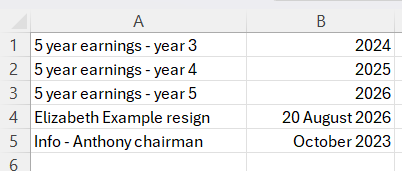
The required format of the import file is:
| Column A | Column B | |
|
Column |
Variable name |
Value |
|
Required |
Required |
Required |
|
Notes |
25 characters maximum length |
100 characters maximum length |
The file can have a maximum of 200 rows.
The following image shows a valid sample file:
Export custom variables
To export custom variables to Excel:
- Click Inputs > Variables
- Click Export
Insert a custom variable
To insert a custom variable into a text block:
- Click Sections > Notes > All notes
- Click to open any note
- Click to edit any text block
- Click the Insert field button
- Click Custom variable
- Select the variable named 'Example'
- Click OK
Edit a custom variable
To edit the value of the variable:
- Click Report Options > Variables
- Find the variable named 'Example'
- Click on the variable value cell and type a new value 'New example text'
- The wording where the variable was inserted in the report will be updated from 'Example text' to 'New example text'
- Alternatively, custom variables can be edited when inserting fields